1) Open this email in your Inbox (See image below)
2) Click Complete Registration and sign in (See image below)
3) Create your username and password (See image below)
Select Create new account
See image below
4) Click skip (See image below)
5) Click Search (See image below)
6A) Enter Your Search Criteria (See image below)
Location ( Example Toronto, Pickering, Ajax, Whitby, Oshawa, Mississauga, Brampton , Vaughan, Richmond Hill, Markham, Newmarket etc)
How to find MLS Locations Click Here
Click On For Sale: To Select For Sale or For Lease
Click On Free Hold: To Select Freehold Or Or Condo
Click On Beds/Bath: To Choose Amount of bedrooms and/ Choose Amount of bathrooms
Click On Price: To Select Price Range from Selection or enter custom amount
Click On More filters: To Select more options see next image
6B) More Filters Selection
For Basement Apartments:
In Basement Option Select: 1) Separate Entrance And 2) Apartment
Make sure there are 2 Kitchens
Make sure there is a washroom in the basement
Make sure that there is enough of parking
Make sure the Laundry Room is in a common area
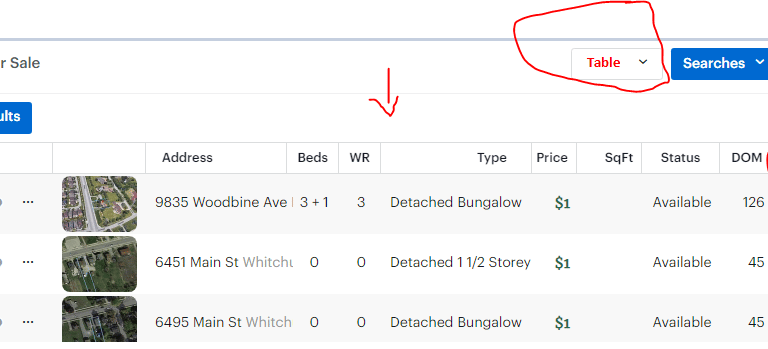
8) Change the layout From Map View to Table View(See image below)
9) Table Layout (See image below)
Click on each listing to see all the details (The next image will show the details page)
10) Details Page (See image below)
Read all the information By Scrolling Down
Any home you like to see, please send me the MLS Numbers of the homes you want to see, separated by a comma for multiple mls numbers
for example N5971575, E1023215, C1234876.
(Do Not Send me The Address, I only need the MLS Numbers)
My Email: Dawson@AwesomeDawson.ca
Support: Call/Text me at 647-509-8289 (Text Preferred. Thanks)